> ## Documentation Index
> Fetch the complete documentation index at: https://archie.com/docs/llms.txt
> Use this file to discover all available pages before exploring further.
# Overview
> What a plan is and why it is the unit of editing in Archie.
A plan is Archie's structured description of your app. Archie generates one from your idea. You edit it until it matches what you want. Then the build uses it as the spec.
Editing the plan is where you spend most of your time. That is by design — the plan is cheap to change (it is structured text), the build is expensive. Steer the plan, then build once.
## What is in a plan
A plan has five sections. Each is independently editable:
* **Overview** — a high-level summary of the app's purpose
* **Modules** — the features and capabilities your app offers
* **User types** — the people who use the app and what each can do
* **System services** — built-in services like authentication, file storage, and roles
* **Integrations** — third-party services your app talks to (Stripe, SendGrid, and so on)
You will also see a **Preview section** with sample screens that visualize how the plan translates into UI.
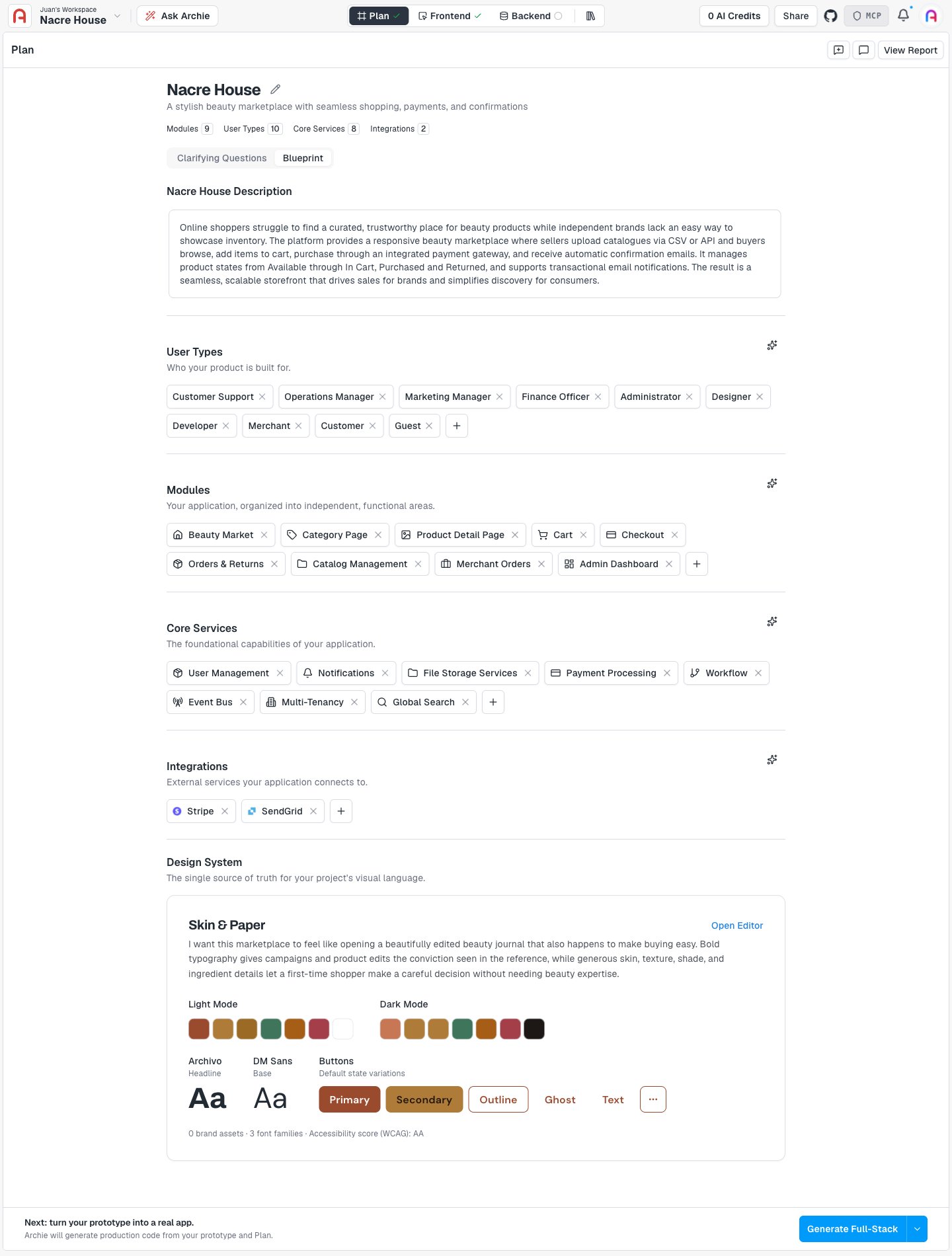 The tech stack (frameworks, runtime, database) is chosen and managed by Archie automatically. It is not shown or editable in the plan — the plan stays agnostic to the underlying stack.
## How the plan relates to the rest of Archie
The plan is the high-level description of your app. The [specifications](/docs/features/specifications/overview) hold finer-grained detail (system requirements, visual design principles, technical decisions). When you run the build, Archie reads the plan and the specifications together.
After the build, the [visual editor](/docs/features/frontend/visual-editor) and [frontend](/docs/features/frontend/overview) surfaces let you make small, direct changes. For larger changes, come back to the plan and rebuild.
## What you will do here
* [Generate](/docs/features/plan/generating) a plan from an idea, answering Archie's clarifying questions along the way
* [Review](/docs/features/plan/reviewing) your generated plan
* Edit each section: [modules](/docs/features/plan/editing-modules), [user types](/docs/features/plan/editing-user-types), [services](/docs/features/plan/editing-services), [integrations](/docs/features/plan/editing-integrations)
* [Iterate](/docs/features/plan/iterating) using the plan chat
* Decide [when to run the build](/docs/features/plan/when-to-build)
## FAQ
Yes. Edit and run again. The next build will incorporate your changes.
No. Each project has one plan. To explore alternatives, create a new project.
Leave it minimal. For example, an internal tool may not need integrations. Archie will not force features into your build.
The tech stack (frameworks, runtime, database) is chosen and managed by Archie automatically. It is not shown or editable in the plan — the plan stays agnostic to the underlying stack.
## How the plan relates to the rest of Archie
The plan is the high-level description of your app. The [specifications](/docs/features/specifications/overview) hold finer-grained detail (system requirements, visual design principles, technical decisions). When you run the build, Archie reads the plan and the specifications together.
After the build, the [visual editor](/docs/features/frontend/visual-editor) and [frontend](/docs/features/frontend/overview) surfaces let you make small, direct changes. For larger changes, come back to the plan and rebuild.
## What you will do here
* [Generate](/docs/features/plan/generating) a plan from an idea, answering Archie's clarifying questions along the way
* [Review](/docs/features/plan/reviewing) your generated plan
* Edit each section: [modules](/docs/features/plan/editing-modules), [user types](/docs/features/plan/editing-user-types), [services](/docs/features/plan/editing-services), [integrations](/docs/features/plan/editing-integrations)
* [Iterate](/docs/features/plan/iterating) using the plan chat
* Decide [when to run the build](/docs/features/plan/when-to-build)
## FAQ
Yes. Edit and run again. The next build will incorporate your changes.
No. Each project has one plan. To explore alternatives, create a new project.
Leave it minimal. For example, an internal tool may not need integrations. Archie will not force features into your build.