> ## Documentation Index
> Fetch the complete documentation index at: https://archie.com/docs/llms.txt
> Use this file to discover all available pages before exploring further.
# Run history & monitoring
> Every run of a scheduled task is recorded with its status, timing, and response. Review the history, run a task on demand, and manage its lifecycle from the Backend Console.
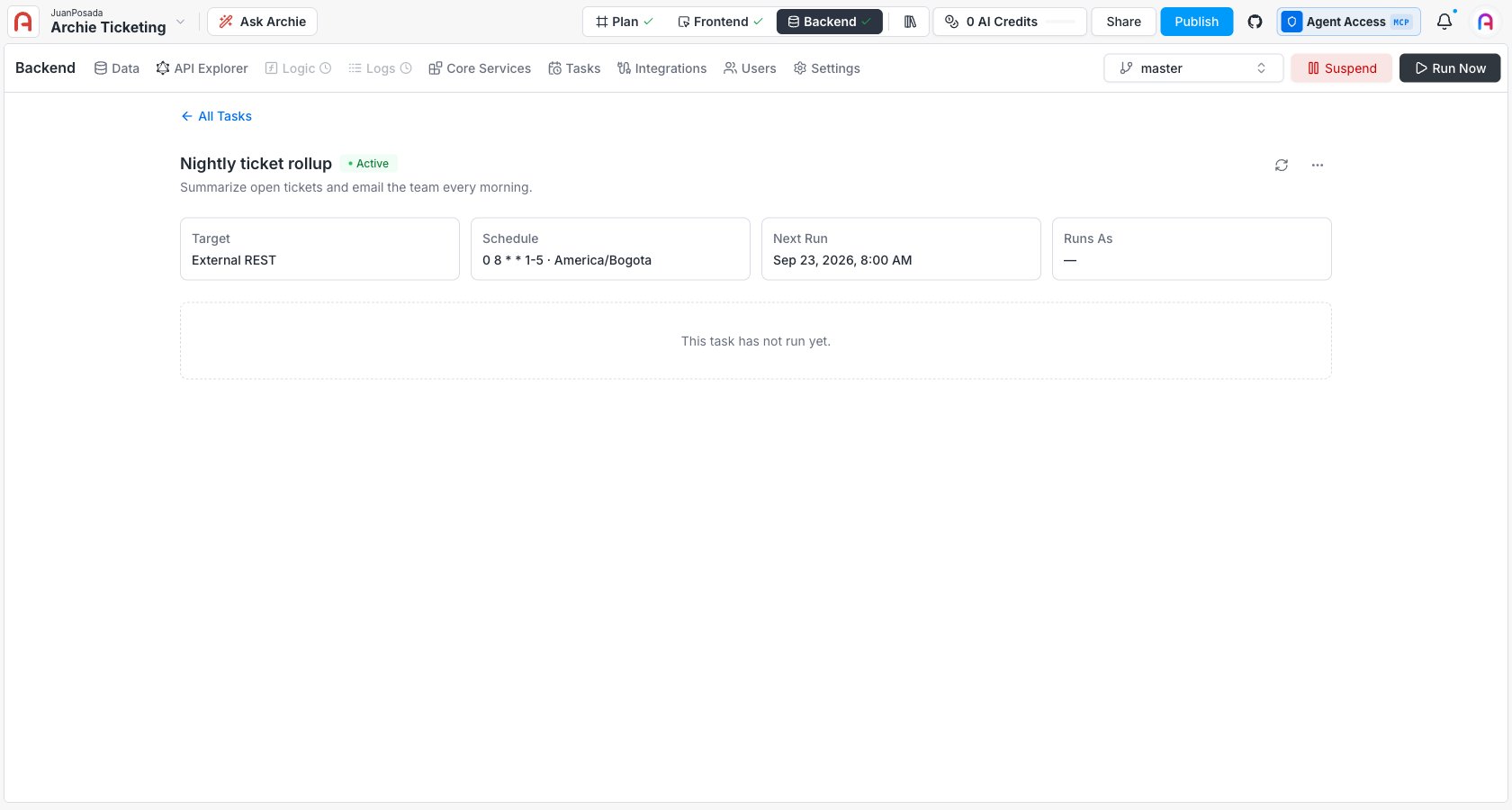
Every time a task fires — on schedule or on demand — it produces an **execution** record. The run history is where you confirm a task is working, and where you look first when it isn't.
Open a task from **Backend → Tasks**.
 ## What a run records
Each execution captures:
* **Status** and **type** (scheduled or manual).
* **Timing** — when it was due to fire, when it started and finished, and how long it took.
* **Attempts** — how many tries it took, including retries.
* **Result** — the HTTP status returned, an error code and message on failure, and a **response excerpt** (the called service's response body, truncated to the task's max-response size).
* A **trace correlation ID** that links to the [Logs](/docs/features/backend/logs) view for the full request and response.
## Execution statuses
| Status | Meaning |
| - | - |
| **Pending** | Enqueued, not started yet. |
| **Running** | In flight. |
| **Success** | Completed successfully. |
| **Failed** | The target returned an error or the call failed. |
| **Timeout** | Exceeded the task's timeout. |
| **Retrying** | Failed and waiting for the next retry. |
| **Cancelled** | Stopped before completing. |
| **Skipped by lock** | A previous run was still going and the task's overlap mode is **Skip**, so this fire was dropped. |
| **Identity revoked** | The task's execution credential was revoked or expired, so the run couldn't authenticate. |
**Skipped by lock** is expected behavior, not an error — it's how the **Skip** overlap mode prevents two runs at once. If you see it often, the task is firing faster than a run completes; widen the schedule, shorten the work, or switch the overlap mode.
## Task health
A task's list entry shows a **health** signal derived from its recent runs. An active task whose last runs all failed is flagged **failing**, along with how many consecutive failures it's had and when it last succeeded. This is a display signal only — a failing task stays **Active** and keeps firing; the flag just makes a broken task easy to spot.
## Run a task on demand
Use **Run Now**, in the header of the task detail view, to fire a task immediately without waiting for its schedule — handy for testing a new task or re-running after a fix. A manual run produces an execution marked as **manual** in the history, alongside the scheduled ones. The schedule is unaffected; the next scheduled fire still happens as planned.
## Manage the lifecycle
The task detail header has **Suspend** (or **Activate** on a suspended task) next to **Run Now**. Its **•••** menu has **Edit** and **Delete**.
| Action | Effect |
| - | - |
| **Suspend** | Stop firing but keep the task. Its next-fire time clears. Status becomes **Suspended**. |
| **Activate** | Resume a suspended task. It picks its schedule back up. |
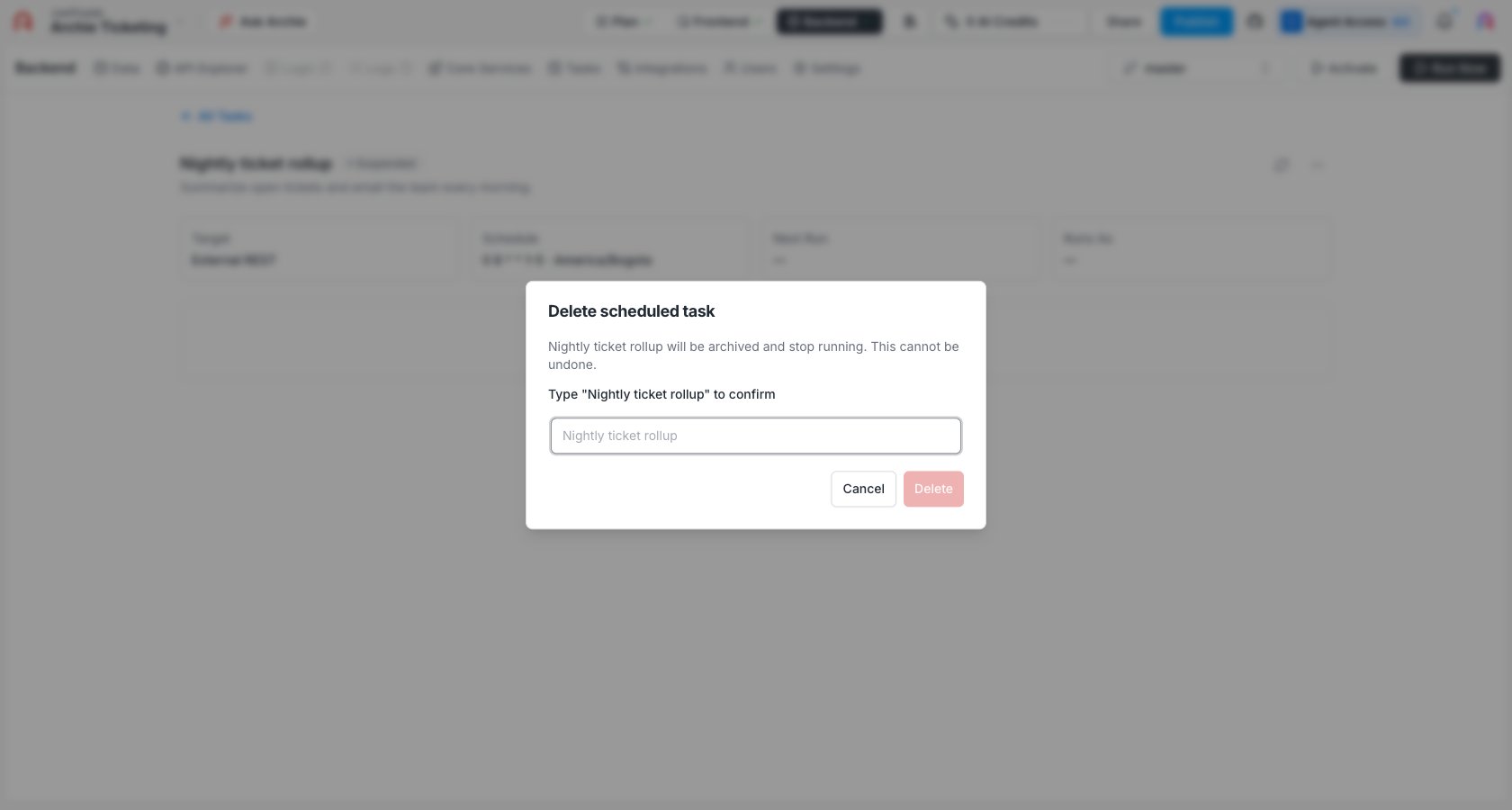
| **Delete** | Retire the task. The confirmation dialog is explicit that this **archives** the task and stops it running — it does not erase the task or its run history — but it cannot be undone from the UI. |
## What a run records
Each execution captures:
* **Status** and **type** (scheduled or manual).
* **Timing** — when it was due to fire, when it started and finished, and how long it took.
* **Attempts** — how many tries it took, including retries.
* **Result** — the HTTP status returned, an error code and message on failure, and a **response excerpt** (the called service's response body, truncated to the task's max-response size).
* A **trace correlation ID** that links to the [Logs](/docs/features/backend/logs) view for the full request and response.
## Execution statuses
| Status | Meaning |
| - | - |
| **Pending** | Enqueued, not started yet. |
| **Running** | In flight. |
| **Success** | Completed successfully. |
| **Failed** | The target returned an error or the call failed. |
| **Timeout** | Exceeded the task's timeout. |
| **Retrying** | Failed and waiting for the next retry. |
| **Cancelled** | Stopped before completing. |
| **Skipped by lock** | A previous run was still going and the task's overlap mode is **Skip**, so this fire was dropped. |
| **Identity revoked** | The task's execution credential was revoked or expired, so the run couldn't authenticate. |
**Skipped by lock** is expected behavior, not an error — it's how the **Skip** overlap mode prevents two runs at once. If you see it often, the task is firing faster than a run completes; widen the schedule, shorten the work, or switch the overlap mode.
## Task health
A task's list entry shows a **health** signal derived from its recent runs. An active task whose last runs all failed is flagged **failing**, along with how many consecutive failures it's had and when it last succeeded. This is a display signal only — a failing task stays **Active** and keeps firing; the flag just makes a broken task easy to spot.
## Run a task on demand
Use **Run Now**, in the header of the task detail view, to fire a task immediately without waiting for its schedule — handy for testing a new task or re-running after a fix. A manual run produces an execution marked as **manual** in the history, alongside the scheduled ones. The schedule is unaffected; the next scheduled fire still happens as planned.
## Manage the lifecycle
The task detail header has **Suspend** (or **Activate** on a suspended task) next to **Run Now**. Its **•••** menu has **Edit** and **Delete**.
| Action | Effect |
| - | - |
| **Suspend** | Stop firing but keep the task. Its next-fire time clears. Status becomes **Suspended**. |
| **Activate** | Resume a suspended task. It picks its schedule back up. |
| **Delete** | Retire the task. The confirmation dialog is explicit that this **archives** the task and stops it running — it does not erase the task or its run history — but it cannot be undone from the UI. |
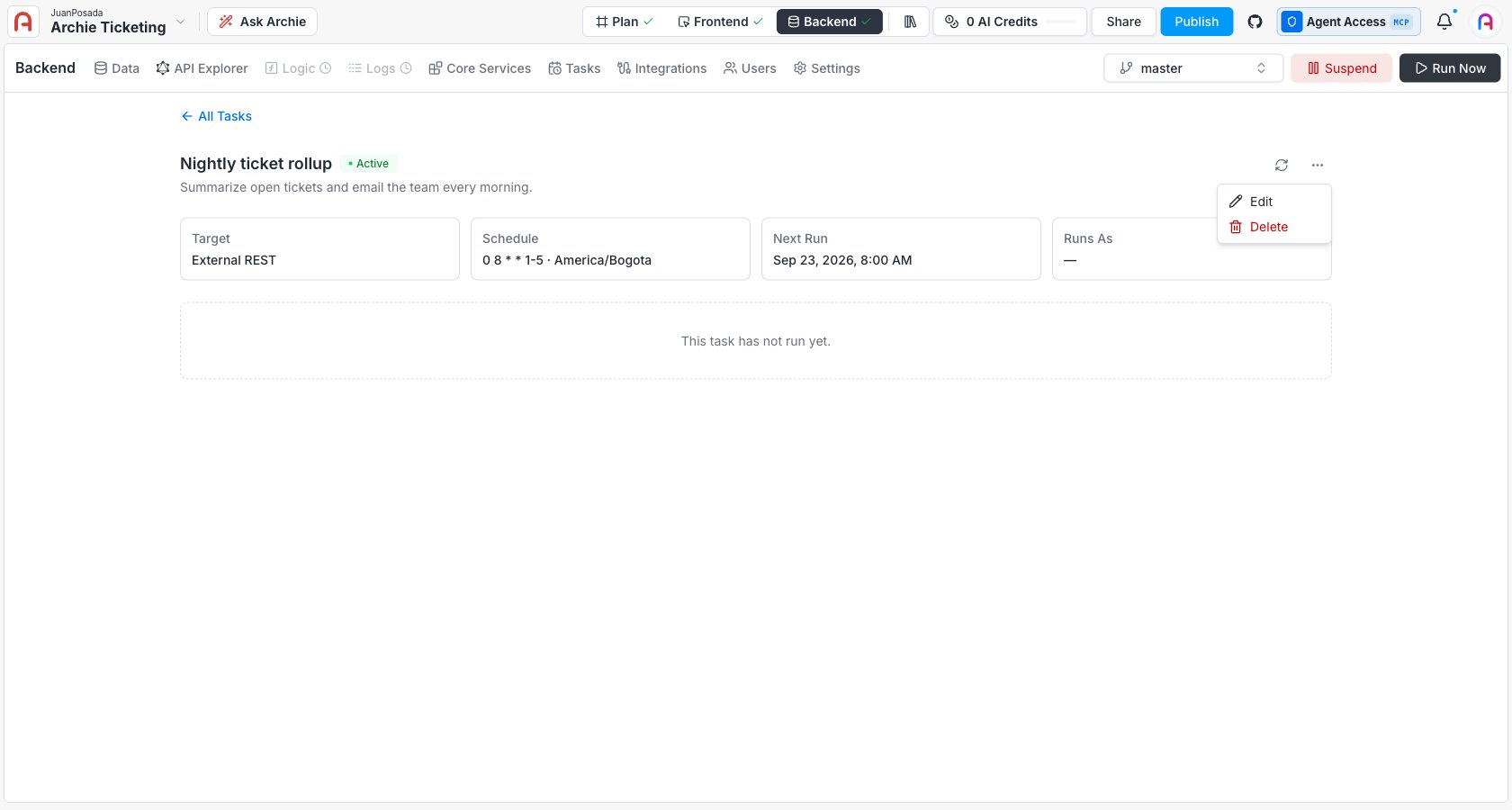
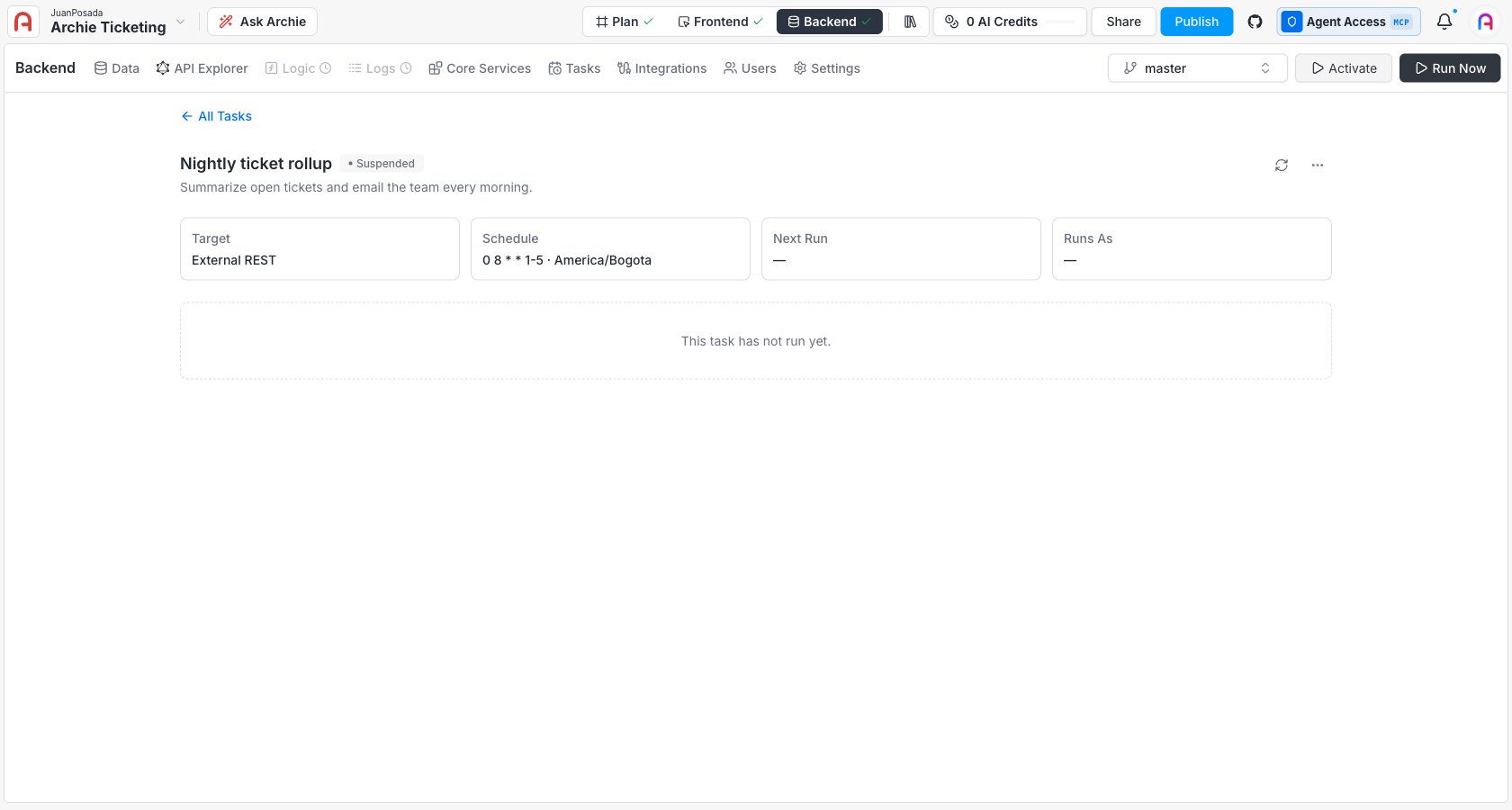 Suspending is reversible; deleting is the retire path, confirmed by typing the task's name.
 ## GraphQL API
Everything the UI does is a GraphQL operation against your project's backend API, so you can manage tasks programmatically with the same calls. Your project and environment are taken from the auth token, not the request — so a token only ever sees its own project's tasks.
**Mutations**
| Operation | Does |
| - | - |
| `createScheduledTrigger` | Create a task. |
| `updateScheduledTrigger` | Edit a task (supports optimistic concurrency via an expected version). |
| `pauseScheduledTrigger` | Suspend a task (the **Suspend** button in the UI). |
| `enableScheduledTrigger` | Resume a suspended task (the **Activate** button in the UI). |
| `archiveScheduledTrigger` | Retire a task (the **Delete** action in the UI). |
| `runScheduledTriggerNow` | Fire a task immediately (**Run Now**). |
**Queries**
| Operation | Returns |
| - | - |
| `schedulerTrigger` | One task by ID. |
| `schedulerTriggers` | The task list, with filters. |
| `schedulerExecution` | One execution by ID. |
| `schedulerExecutions` | A task's run history, with filters. |
| `schedulerResolveSchedule` | The cron expression for a natural-language schedule (no task is created). |
`schedulerResolveSchedule` is pure — it just turns a plain-language schedule into a cron expression and returns it. It's what the natural-language mode in the [create form](/docs/features/backend/scheduled-tasks/creating-a-task#set-the-schedule) calls before you save.
## FAQ
Open its run history and read the failed execution: the HTTP status, error message, and response excerpt usually say why. For the full request and response, follow the run's trace correlation ID into the [Logs](/docs/features/backend/logs) view.
The API key the task dispatches with was revoked or expired. Edit the task, paste a fresh key, and save. Rotate the key on the task before revoking the old one to avoid the gap.
No. It fires one manual run immediately and records it in the history. The recurring schedule is untouched — the next scheduled fire still happens on time.
Suspend is a reversible off switch — click **Activate** later and it resumes. **Delete** retires the task for good; the confirmation dialog says this archives it rather than erasing it, but there's no UI path back. Both keep the run history.
## GraphQL API
Everything the UI does is a GraphQL operation against your project's backend API, so you can manage tasks programmatically with the same calls. Your project and environment are taken from the auth token, not the request — so a token only ever sees its own project's tasks.
**Mutations**
| Operation | Does |
| - | - |
| `createScheduledTrigger` | Create a task. |
| `updateScheduledTrigger` | Edit a task (supports optimistic concurrency via an expected version). |
| `pauseScheduledTrigger` | Suspend a task (the **Suspend** button in the UI). |
| `enableScheduledTrigger` | Resume a suspended task (the **Activate** button in the UI). |
| `archiveScheduledTrigger` | Retire a task (the **Delete** action in the UI). |
| `runScheduledTriggerNow` | Fire a task immediately (**Run Now**). |
**Queries**
| Operation | Returns |
| - | - |
| `schedulerTrigger` | One task by ID. |
| `schedulerTriggers` | The task list, with filters. |
| `schedulerExecution` | One execution by ID. |
| `schedulerExecutions` | A task's run history, with filters. |
| `schedulerResolveSchedule` | The cron expression for a natural-language schedule (no task is created). |
`schedulerResolveSchedule` is pure — it just turns a plain-language schedule into a cron expression and returns it. It's what the natural-language mode in the [create form](/docs/features/backend/scheduled-tasks/creating-a-task#set-the-schedule) calls before you save.
## FAQ
Open its run history and read the failed execution: the HTTP status, error message, and response excerpt usually say why. For the full request and response, follow the run's trace correlation ID into the [Logs](/docs/features/backend/logs) view.
The API key the task dispatches with was revoked or expired. Edit the task, paste a fresh key, and save. Rotate the key on the task before revoking the old one to avoid the gap.
No. It fires one manual run immediately and records it in the history. The recurring schedule is untouched — the next scheduled fire still happens on time.
Suspend is a reversible off switch — click **Activate** later and it resumes. **Delete** retires the task for good; the confirmation dialog says this archives it rather than erasing it, but there's no UI path back. Both keep the run history.