> ## Documentation Index
> Fetch the complete documentation index at: https://archie.com/docs/llms.txt
> Use this file to discover all available pages before exploring further.
# Text field
> Text fields store strings of any length. The most versatile field type, suitable for names, titles, descriptions, and free-form content.
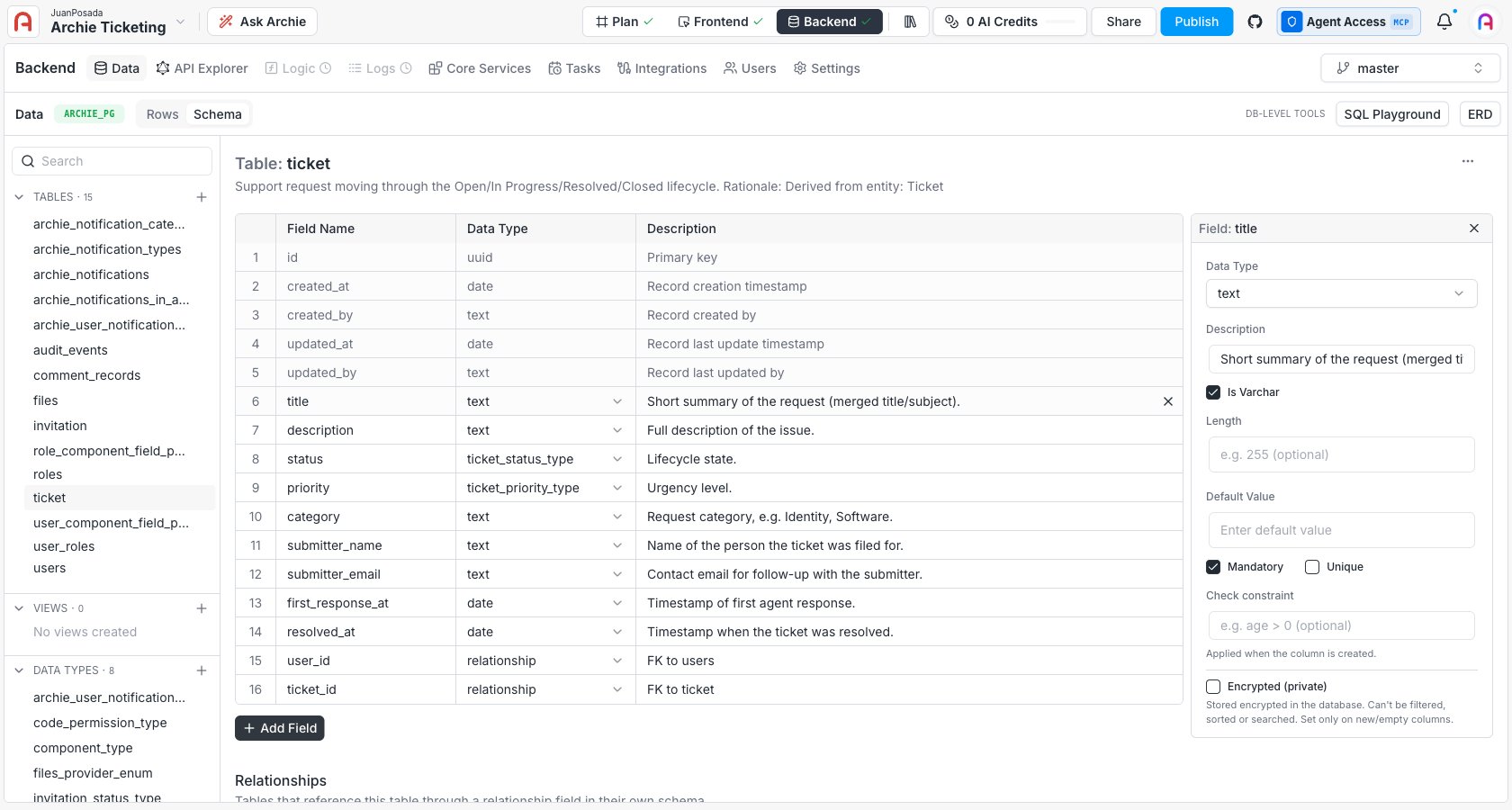
A Text field stores alphanumeric string data. It's the most versatile field type and handles everything from short identifiers (a username) to long-form content (a blog post body).
## Text vs. Varchar
By default, a Text field is stored as PostgreSQL's `TEXT` type — a variable-length string with no specific limit (up to 1 GB per value). Toggling **Is Varchar** stores it as `VARCHAR` instead, which lets you specify a maximum character length.
| Mode | Underlying type | When to use it |
| - | - | - |
| **Default (Is Varchar off)** | `TEXT` | Most fields. No length limit, no measurable performance difference for typical content. |
| **Is Varchar on** | `VARCHAR(n)` | When you want to enforce a maximum length at the database level — for example, a 2-letter country code or a 280-character message. |
## Configuration options
| Option | Description |
| - | - |
| **Name** | The system identifier used in the GraphQL and REST APIs (for example `first_name`, `email`, `title`). |
| **Description** | An optional internal note explaining the field's purpose. |
| **Is Varchar** | Off (default) stores the value as `TEXT`. On stores it as `VARCHAR` with an optional length limit. |
| **Default Value** | A value automatically assigned if no string is provided. |
| **Mandatory** | If on, enforces `NOT NULL` — the record cannot be saved with this field empty. |
| **Unique** | If on, no two rows can share the same string. Useful for emails, usernames, slugs. |
 ## How it appears in the API
The field is generated as a `String` in GraphQL and as a JSON string in the REST API. See the [GraphQL API Explorer](/docs/features/backend/graphql-api-explorer/overview) for the generated queries and mutations.
## Permissions
Text fields are subject to the per-role read and write rules configured in [Role-Based Access](/docs/features/backend/app-services/role-based-access). Use that page to hide sensitive fields (for example, internal notes) from specific user types.
## FAQ
Only when you want the database to enforce a maximum character length — for example, a fixed-width code or a tweet-style message cap. For everything else, leave it off.
Use [JSONB](/docs/features/backend/data-model/fields/jsonb). Text stores the list as one opaque string; JSONB lets you query specific elements and is faster to filter on.
Enable **Unique**. The auto-generated mutations validate uniqueness; for case-insensitive matching at the application layer, normalize values to lowercase before saving.
Not for typical content. PostgreSQL stores large text values out-of-line automatically. Indexing very long strings is what costs — keep `UNIQUE` and indexed Text fields short.
## How it appears in the API
The field is generated as a `String` in GraphQL and as a JSON string in the REST API. See the [GraphQL API Explorer](/docs/features/backend/graphql-api-explorer/overview) for the generated queries and mutations.
## Permissions
Text fields are subject to the per-role read and write rules configured in [Role-Based Access](/docs/features/backend/app-services/role-based-access). Use that page to hide sensitive fields (for example, internal notes) from specific user types.
## FAQ
Only when you want the database to enforce a maximum character length — for example, a fixed-width code or a tweet-style message cap. For everything else, leave it off.
Use [JSONB](/docs/features/backend/data-model/fields/jsonb). Text stores the list as one opaque string; JSONB lets you query specific elements and is faster to filter on.
Enable **Unique**. The auto-generated mutations validate uniqueness; for case-insensitive matching at the application layer, normalize values to lowercase before saving.
Not for typical content. PostgreSQL stores large text values out-of-line automatically. Indexing very long strings is what costs — keep `UNIQUE` and indexed Text fields short.